Verification in Orion Board
Verification confirms members are 18+ to access adult content. Members open verification tickets from 🎫open-a-ticket. Staff complete verification using /verify or the Verify button on the Orion Board.
As of July 1, 2026 at 2:00 PM EST, VRChat age cross verification no longer grants server access. Members can still cross-verify through VRChat (button: VRChat (Temp Disabled)), but this is preserved only in case we revert the decision. Cross-verifying assigns @Blocked VRC Verified ❌ instead of unlocking the server.
Verification Panel Options
When members open a verification ticket, they choose from:
| Option | Description |
|---|---|
| Regular ID | Government-issued ID with selfie. Handled by the ticket bot. Grants @Eden Verified when completed by staff. |
| VRChat (Temp Disabled) | Uses Hephia V2i. Does not grant server access. Handled by Hephia, not the ticket bot. Assigns @Blocked VRC Verified ❌. |
| Verify Using Fansly | Fansly creator cross verification. Handled by the ticket bot. Requires a verified Fansly creator account (blue checkmark on profile). Does not grant @Eden Verified on its own — members still need a verification ticket for full access. |
Fansly Cross Verification
To use Fansly cross verification from the ticket panel:
- Create a Fansly account at fansly.com and complete creator verification.
- A blue checkmark on their Fansly profile means they are ready to use our system.
- Creator verification typically takes 1 hour to a few hours.
- Once verified on Fansly, they can use Verify Using Fansly from the ticket panel.
Upgrading to Eden Verified
Members with @VRC Verified or Fansly verification can gain full server access by:
- Regular ID verification — open a verification ticket in Eden, or
- Fansly cross verification — via the ticket panel, then complete Eden verification if needed
VRC Verified and Fansly Verified members can now open verification tickets to obtain the @Eden Verified role (this was not possible before).
/verify is the ONLY Way to Verify
Staff cannot manually assign the Eden Verified role. You must use one of these:
/verify— Run in the verification ticket thread in Discord. No options; just run the command.- Verify button — On the Orion Board: Verifications → click the ticket → click the Verify button.
/verify
Completes verification. Cutie Helper: initial only. Moderator: initial or final (a different person must do final). Must be in the verification ticket thread. When verifying a member who had @VRC Verified or @Blocked VRC Verified ❌, Orion automatically removes those roles and grants @Eden Verified.
— Click this on the verification ticket page in Orion Board to complete verification.
Hephia, Orion, and Role Rules
- Hephia/Orion removes the Unverified role when verification completes. Staff do not assign roles manually.
- Unverified can be removed manually only when the user already has a verification role. It cannot be removed otherwise—this is a protection measure.
- Only admins can bypass and make manual changes without Hephia rollback.
- Upgrading VRC Verified members: When staff complete ID verification for a member with @VRC Verified or @Blocked VRC Verified ❌, Orion removes those roles and grants @Eden Verified automatically. No manual role changes needed.
- Second verification fix: If a member needs to fix their verification on the second review, Orion now removes the @Unverified role automatically when @Eden Verified is still present—moderators no longer need to remove Unverified manually.
Important Behaviors
- No more than 1 verification ticket per user at a time
- @Eden Verified is the role that grants full server access (formerly called "Verified")
- VRChat verify while ticket is open: If a user has an open verification ticket and cross-verifies with VRChat, the system warns them that it is not enough. The ticket is not scheduled for auto-deletion.
- Verified elsewhere while ticket is open (Eden Verified): If a user has an open verification ticket and becomes fully verified through another valid means, the system detects it. The ticket receives a message with a button for the opener to close the ticket. If they do nothing, the ticket is auto-deleted 24 hours after that message.
- Verification tickets are auto-deleted 1 min after close when the opener sent attachments or image links (sensitive content removal)
- If the user leaves the server, tickets auto-close
/reminder— Use to ping the ticket opener when it's been over 24h since the last reply request. Reminders can only be sent 24h apart and at least 12h after the ticket was opened. Optional custom message; a default reminder is available.- @Cutie Helper: initial verification only
- @Moderator: final verification (a different person must do final). A Moderator cannot verify if they did the initial verification.


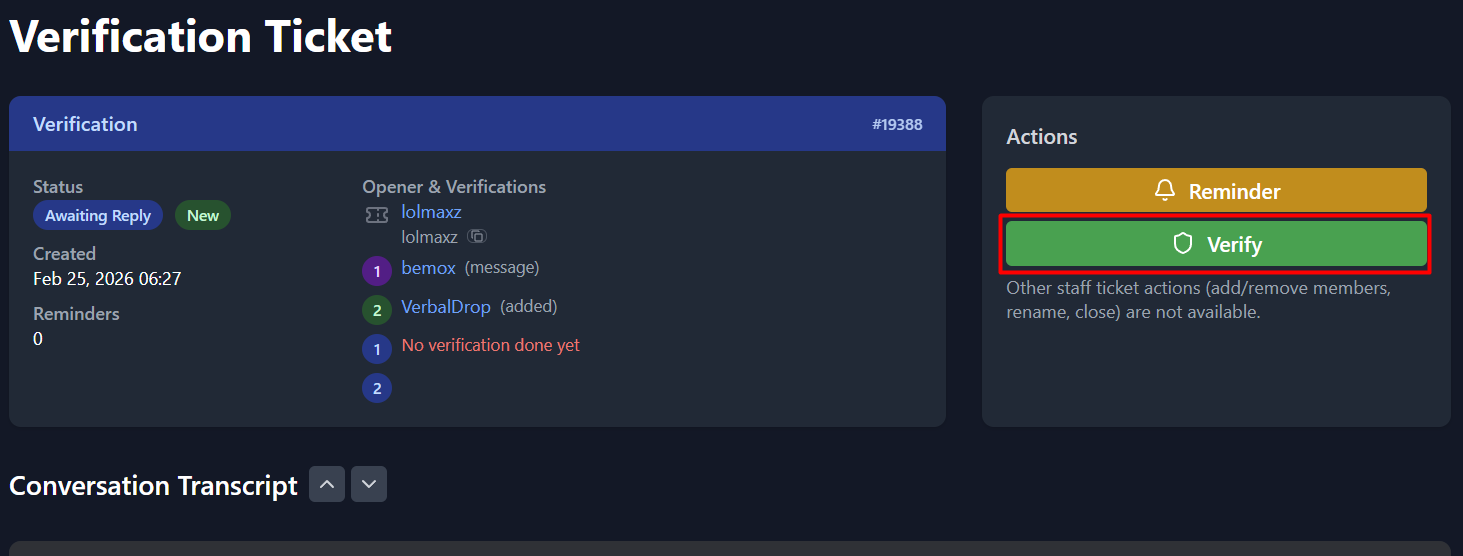
Verification ticket detail page with Verify button.

Using /verify in a Discord ticket thread.