Verification in Orion Board
Verification confirms members are 18+ to access adult content. Members open verification tickets from the ticket panel. Staff complete verification using /verify or the Verify button on the Orion Board.
Verification Panel Options
When members open a verification ticket, they choose from:
| Option | Description |
|---|---|
| Regular ID | Government-issued ID with selfie. Handled by the ticket bot. |
| VRChat Age Verification | Uses Hephia V2iHephia V2 is used for our VRChat age verification system only. Handled by Hephia, not the ticket bot. |
| Fansly Age Verification | If enabled. Handled by the ticket bot. |
/verify is the ONLY Way to Verify
danger
Staff cannot manually assign the Verified role. You must use one of these:
/verify— Run in the verification ticket thread in Discord. No options; just run the command.- Verify button — On the Orion Board: Verifications → click the ticket → click the Verify button.
/verifyCutie Helper, Moderator only can use this.
Completes verification. Cutie Helper: initial only. Moderator: initial or final (a different person must do final). Must be in the verification ticket thread.
— Click this on the verification ticket page in Orion Board to complete verification.
Hephia and Role Rules
- Hephia removes the Unverified role when verification completes. Staff do not assign roles manually.
- Unverified can be removed manually only when the user already has a verification role. It cannot be removed otherwise—this is a protection measure.
- Only admins can bypass and make manual changes without Hephia rollback.
Important Behaviors
- No more than 1 verification ticket per user at a time
- Only 1 verification type per member (@VRC Verified OR regular @Verified, not both)
- Verified elsewhere while ticket is open: If a user has an open verification ticket and gets verified through another means (e.g., VRChat/Hephia), the system detects it. The ticket receives a message with a button for the opener to close the ticket. If they do nothing, the ticket is auto-deleted 24 hours after that message.
- Verification tickets are auto-deleted 1 min after close when the opener sent attachments or image links (sensitive content removal)
- If the user leaves the server, tickets auto-close
/reminder— Use to ping the ticket opener when it's been over 24h since the last reply request. Reminders can only be sent 24h apart and at least 12h after the ticket was opened. Optional custom message; a default reminder is available.- @Cutie Helper: initial verification only
- @Moderator: final verification (a different person must do final). A Moderator cannot verify if they did the initial verification.


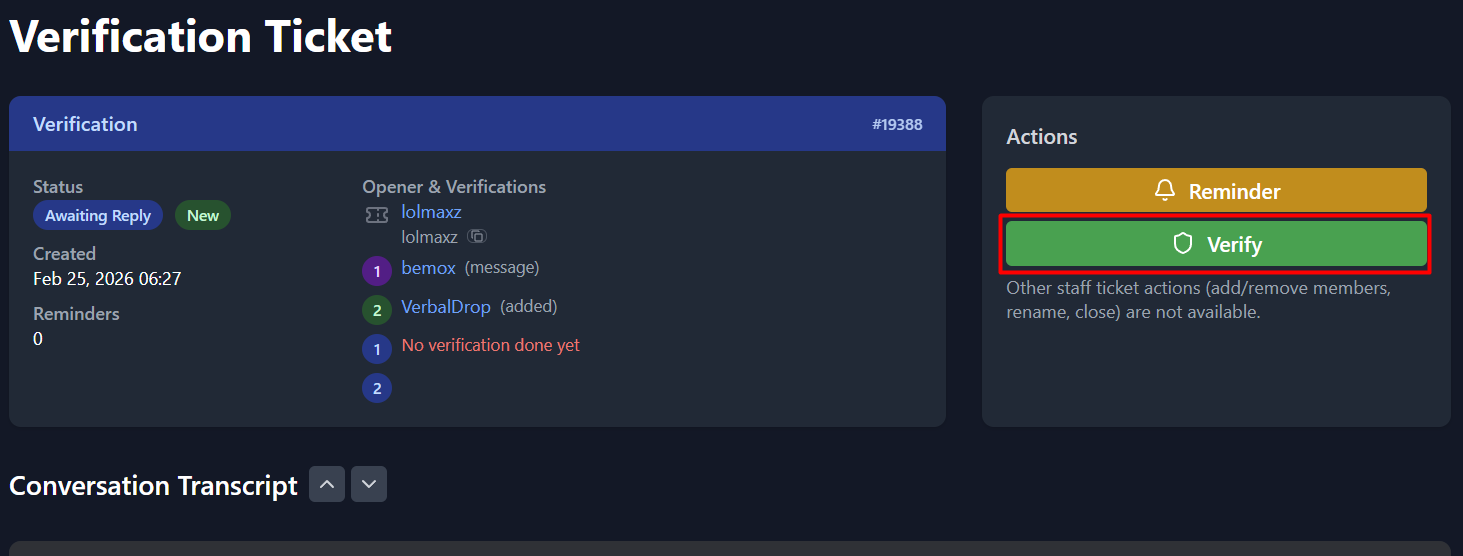
Verification ticket detail page with Verify button.

Using /verify in a Discord ticket thread.