Orion Board
Orion Board is our in-house ticket and moderation system. It replaces GitHub Warning Books, Discord channel logging, and manual record-keeping for server and event warnings, bans, watchlist, host discretion, tickets, and verification.
Access the Orion Board dashboard (Discord OAuth2 login required):
Open Orion BoardCritical Changes Staff Must Know
✅/verify is the ONLY way to verify
Staff cannot manually assign the Verified role. Use /verify in the ticket thread or the Verify button on the Orion Board. Hephia removes the Unverified role when verification completes.
💬Reply from the dashboard
Staff can send messages to Discord tickets directly from Orion Board without being in Discord. This is a new, highly useful feature—you can respond to tickets from anywhere.
🎫Server ticket types
Brand new ticket types are now available. Filter and organize by type in the dashboard:
🎫Event ticket types
Brand new ticket types are now available. Filter and organize by type in the dashboard:
📋No more Mod-on-call
Tickets, warnings and watchlist entries are now in one place, automatically organized. The Mod-on-call page is deprecated.
📚No more GitHub Warning Books
All moderation logging is in Orion Board. Server Moderation Logs, Watchlist, Kicks & Bans, and Host Discretion are all managed in the dashboard.
📋No reason needed to close
You no longer need to specify a reason when closing tickets or completing verification. Orion Board tracks who did what automatically— A major change from our previous system.
Quick Links
- Dashboard Overview — Navigation, layout, ticket closure, notifications, settings
- Slash Commands Reference — Full list of all commands with quick descriptions
- Verification — /verify command, Verify button, verification panel options
- Moderation and Warnings — Server and event warnings via slash commands
- Bans and Kicks — Event bans, Ban Details modal
- Watchlist — Server and event watchlist
- Orion Host Discretion — Host discretion in Orion Board; full policy: Host Discretion List
- Searching Members — How to find users and view member profiles
- Data Protection and Privacy — Permissions, access limits, and how we protect sensitive data
Notifications
The notification bell in the top navbar alerts you to important updates. Notifications include: event bans (happening or expiring)—targeting event staff only—and custom notifications sent by high staff or admins. You can turn notifications off completely in Settings.
Staff Analytics
High staff have access to limited analytics about staff performance (server-side data only for now). This is available from the dashboard for those with the appropriate permissions.
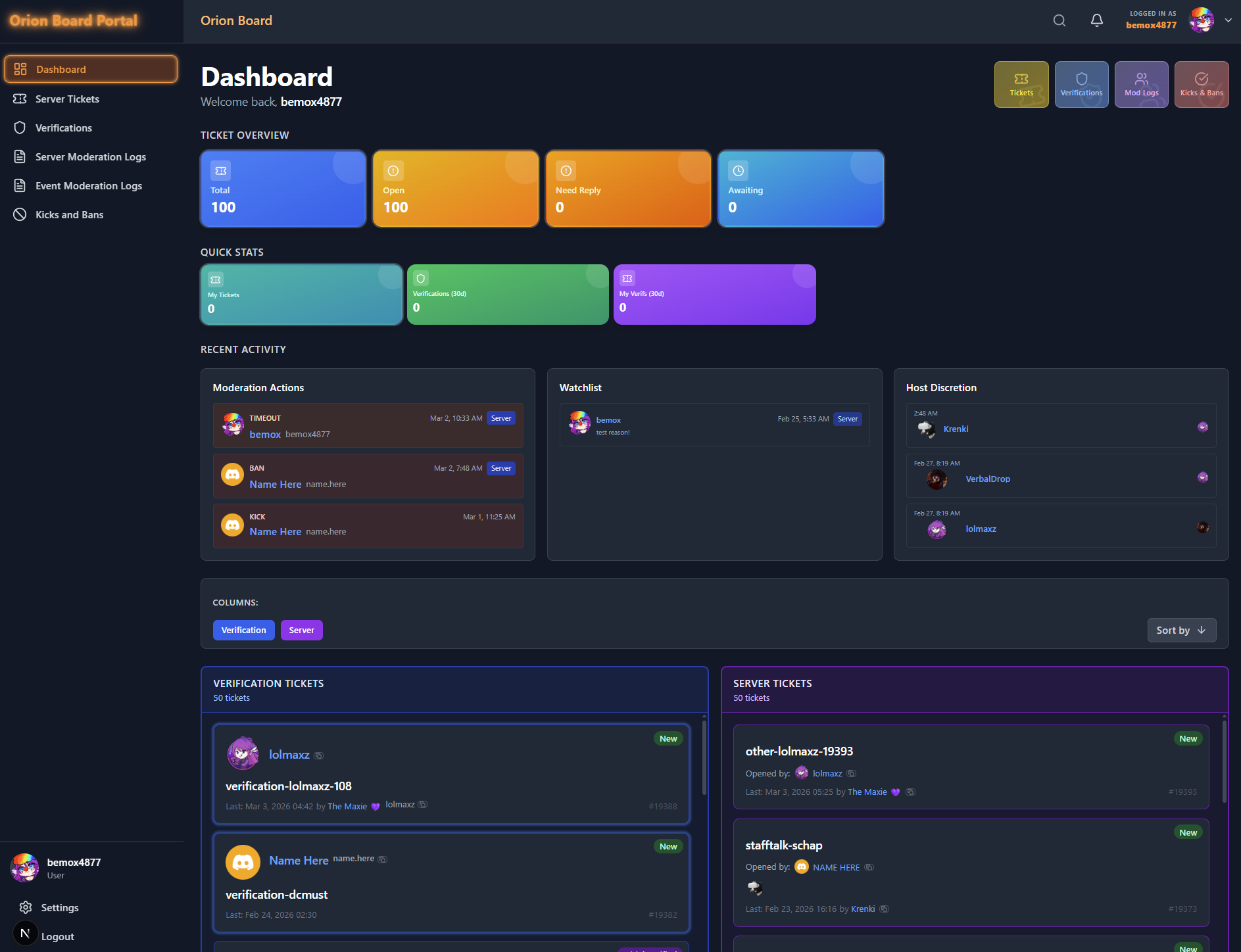
Main dashboard with ticket columns and stats.
Quick link from Discord
Staff can also find a quick link to open Orion Board directly in the ticket panel in 🎫open-a-ticket.
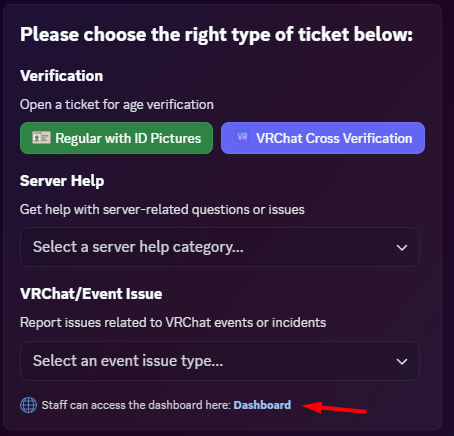
Orion Board button in the ticket panel.