Staff-Talk Tickets
This page covers procedures for @Moderator only. @Cutie Helper cannot open or manage Staff-Talk tickets independently.


Cutie Helpers may observe these tickets as part of their training but cannot issue warnings, mutes, or punishments.
For the first 2 months as a @Moderator, draft your messages in 📙moderators and get approval from a @Server Committee Member before opening tickets.

Important Guidelines
- Punishment/Action Tickets
- Punishment tickets must be opened by Moderators only.
- Only 1 staff member may talk within a ticket at a time. Do not dogpile into the ticket
- Do not give out any punishments in tickets started by a member.
Never start the ticket by stating the punishment. This is critical - always begin with a respectful conversation, explain the situation, and then discuss consequences.
While these tickets will be used to dish out a punishment, we still want to treat members with respect. Starting directly with punishment creates a hostile environment and damages trust.
❌What NOT to do
- You're being given a 3-day timeout for breaking the rules.
- You violated [rule] and are being warned.
- Here's your punishment: [punishment type].
✅What TO do
- Start with a polite request for their time
- Share evidence before discussing consequences
- Explain the rule violation clearly
- Allow the member to respond and explain
- Only then discuss the punishment
- Maintain a respectful, professional tone throughout
Example: Professional Ticket Opening
Here's an example of how to properly handle a staff-talk ticket from start to finish:


Key points from this example:
- ✅ Starts with a polite request for their time
- ✅ Shares evidence before discussing consequences
- ✅ Explains the rule violation clearly
- ✅ Allows the member to respond and explain
- ✅ Acknowledges their response respectfully
- ✅ Only then discusses the punishment
- ✅ Confirms understanding before closing
- ✅ Maintains a respectful, professional tone throughout
Setting up a Ticket
- Go to 🎫𝘖pen-a-𝘛icket and open the Server Help dropdown. Select Other (not "Talk to a Staff"—Staff Problem directs members to HR and does not create a ticket).
- Rename the ticket using
/renameto:Stafftalk-Usernameor similar.
- ⚠️ Note:
/renamehas a cooldown. If it fails due to cooldown or permissions, rename the ticket thread title manually.
- Add the user to the ticket with
/add-member.
Renaming and adding/removing members can also be done from the Orion Dashboard. See Orion Board: Commands.
Communicating with the Member
Use a calm, professional tone. Keep messages short, clear, and focused on facts.
- Start by politely asking for their time
- Share the evidence first (screenshots/links)
- State the specific rule and how it was broken
- Ask for their perspective; avoid arguing or debating
- Explain the outcome and next steps
- Thank them for their time and confirm understanding
If it becomes too much to handle, request help from another @Moderator in 📙moderators.
Remain calm and objective! If you feel yourself getting frustrated, please step away and ask for help.
Short Example
Issuing Punishments
- Inform them of the punishment according to the Staff Guidelines and ask them to acknowledge the punishment.
Do not remove the member before they have acknowledged the punishment. We need explicit acknowledgement to confirm they read and understood the rule break and the action taken.
While waiting for acknowledgement, ping the member every ~24 hours to bring the ticket back to their attention. Use /reminder in the ticket—optional custom message, or use the default. Reminders can only be sent 24h apart and at least 12h after the ticket was opened. If they remain unresponsive for two weeks (or are clearly active elsewhere while ignoring the ticket), you may request to temporarily remove their verification until they respond in 📙moderators by adding back the @Unverified Role.

If this still does not work, the @Head Moderator may decide to close the ticket and log it as "unresponsive".
- Remove the member from the ticket after they acknowledge the warning/punishment using
/remove-member.
When staff feel the user is done—but want the member to close when they're ready—use /close-request. The ticket opener gets Close/Deny buttons. Only the opener can use them.
Logging the Ticket
- Log the ticket in Orion Board. Link the ticket to the moderation action when applicable. See Moderation Records (Orion Board) and Orion Board: Moderation and Warnings.
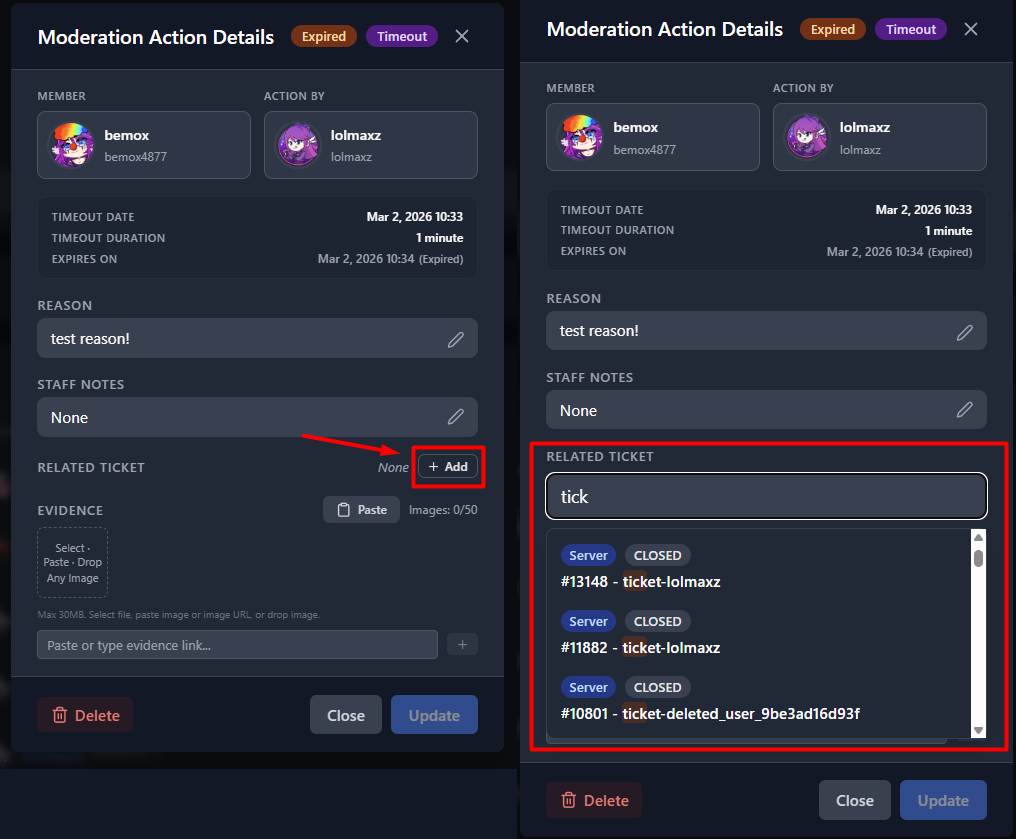
Linking a ticket to a moderation action.
Properly handling tickets ensures transparency and fairness for members involved!
Training Cutie Helpers
As a @Moderator, you are expected to assist and train @Cutie Helper. When handling Staff-Talk tickets:
- Allow Cutie Helpers to observe the ticket process
- Explain your reasoning and approach
- Answer their questions in 📙moderators
- Remember: they cannot issue punishments themselves, but learning by observation is valuable